Friday, January 5, 2024

New Year, New You! New Ways To Promote Your Library Program and Yourself! Register For My Upcoming Follett Webinar Here, Friends.

As we kick off a new year in a few months, I am excited to share my upcoming Follett webinar too. 

This one is called, New Year, New You! New Ways To Promote Your Library Program and Yourself!

It's on January 18, 2024 at 4:00pm CST. 

As shared in the invite online, 

Kick off the new year in a great way, with new ideas to take you through the entire school calendar. Join Shannon McClintock Miller at 4pm CST, when she will share what’s worked in her library to promote her program, holidays, reading, engagement, and more! It’s a brand-new year and the perfect time to think about all the things we can do to promote our library program and ourselves, as teacher librarians. In this exciting webinar, Shannon McClintock Miller will share a multitude of ideas and resources to promote reading, learning, and making through book displays, calendars, choice boards, digital tools, STEAM, collaboration, advocacy, and so much more. She’ll look ahead at holidays and events and share ways you can prepare with resources, Titlewave nodes, and Collections. You won’t want to miss this one, or your opportunity to kick off the year with Shannon! She will provide a takeaway calendar of events for each attendee. Attendees will learn ideas for:
• Setting goals for the new year • Promoting reading through book promotions and displays, book clubs, virtual reading choice boards, and more • Cool technology tools to use as a librarian • Tips for successful collaboration and advocacy Scheduling conflict?
We’ve got you covered! Register and we’ll send you the recording shortly after the webinar ends.

You can register for the webinar here today. Hope to see you there, friends.

Here Is The "January Choice Board Poster"....Making Choice Boards Easy & Organized For All Students To Access & Use

Hi friends, 

I want to share a little tip that I have been using for all of the different choice boards we use each month.  This will help when organizing and sharing choice boards with students at school and those learning remotely.  

Each month after I have my choice boards done, I pull them together in another Google Slide choice board.  

I add each choice board as an image and link the choice board to that image.  Under the image, I add a QR code that I make in QR Code Monkey for each choice board too.  

Our teachers can share the monthly choice board posters in Seesaw and Google Classroom.  This works great for our students at school and those learning at home.  

We also print the posters so our students with iPads can scan the QR codes.  This can also be projected on the screen in the classrooms for students to walk up to and scan.  

For this month, I have created Our January Choice Boards poster that can be found here to share with your students and here to make edits and additions.

You will find the January Choice Boards, with directions on how to share, in this post too. 

I hope you find these choice board posters helpful too. 

Wednesday, January 3, 2024

It's Here, Friends...Our January 2024 Choice Boards!

Happy New Year, friends. I hope you had a relaxing and fun holiday season. 

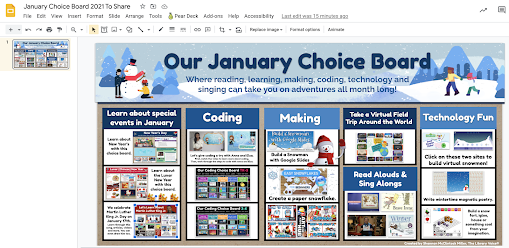
With the new year here, so it the January choice board!  Our January Choice Board where reading, learning, making, coding, technology and music can take you on adventures all month long. 

For January, the choice board is filled with so many new and exciting things!  I can't wait to share it with our students, teachers and families, and all of you. 

You will find Our January Choice Board here to make a copy to use with your students and school community.  This is the published link to share with your students. 
With the monthly choice board, I do include other choice boards and special holidays and celebrations. 
You will find the New Year's Day Choice Board link here to share with students....You make a copy to edit here.
You will find the Lunar (Chinese) New Year Choice Board link here to share with students.  You can make a copy to edit here
You will find the Martin Luther King Jr. Choice Board link here to share with students.  You can make a copy to edit here
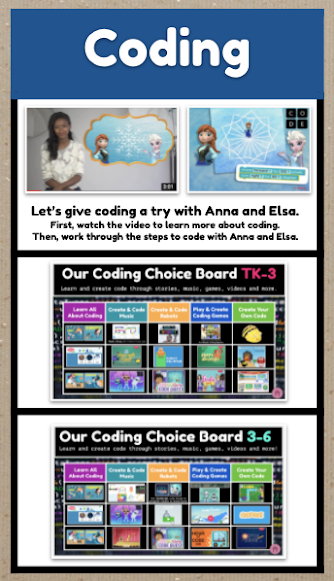
I always include the Coding Choice Boards, along with a special coding activity. 
You will find the Elementary Coding Choice Boards here
And I always include the Let's Take A Trip Around The World Buncee found here
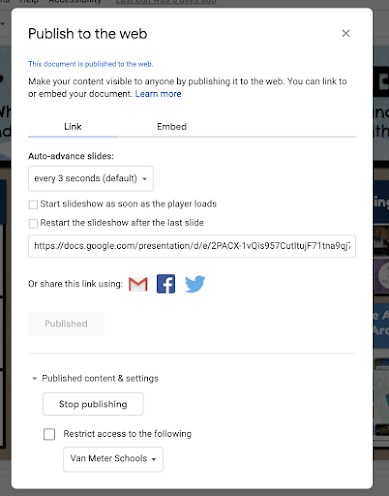
I create most of my choice boards in Google Slides. With each choice board in Google Slides, I share this with our students and teachers by publishing it to the web. 
In the image above, you can see how to do this by clicking on Share and Publish to the Web. 
The Publish to the Web window pops up that will direct you to publish to the web. It will give you a link that you will copy to share with students and teachers through Google Classroom, Seesaw and any other place you want to share this like social media and through QR codes. 

You will find Our January Choice Board here to make a copy to use with your students and school community.  This is the published link to share with your students. 

Please let me know if you have any questions or need help sharing and creating choice boards.  

I hope the monthly and special choice boards will give you and your students special opportunities for reading, learning, creating, collaborating and having fun all year long.