Wednesday, November 22, 2023

Building A NEW BOOK LIBRARY For Our Readers This Year. Find The Template and Directions For Destiny Discover Here, Friends.


I love sharing all of the new books we add to our library throughout the year.  Not only is it exciting for our students to see what is being added to our library collection, it is important for our teachers to know as these books support their curriculum, classroom and of course, their readers. 

This year, I wanted to create a virtual place where these new books can be featured. 
I did it in a choice board...
...and embedded it within our Destiny Discover. 
                          
There is a place for Picture Books, 

Early Readers, 

Chapter Books, 

                         
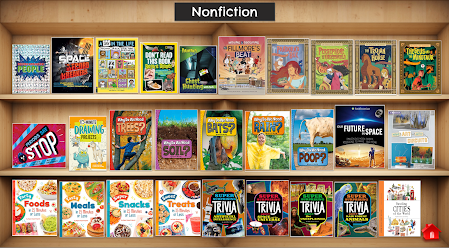
Nonfiction, and more. 
This is the template that I created for the New Book Library choice board. You can find a copy here to use for your library collection too. 

My library associate, Natasha, adds the book covers as she adds new books to Destiny. 

I also wanted to use this choice board as a place to tie in Destiny Discover. 

We did this by using the Share links for each book found in Destiny Discover. 

When you look up a book in Destiny Discover, you will see the three little dots on the right hand side as shown in the picture above.  Click on those...
...and this drop down menu pops up.  

Click on Share...
...and you will find all the ways you can share a book.  You can download a QR code, share a link and explore title details to Google Classroom (or One Drive). 
For the choice board, we grab the URL to Share...
...and take it over to the choice board to attach to the book cover.  

When it is clicked on in the choice board, it will take readers to the book in Destiny Discover where they can read more about the book, see if it is checked in or out, and even put a hold on the book.
If you want to use the template to create your own New Book Library choice board, remember to share the Published Link.  You find that by going to File, down to Publish to web, and sharing that published link. 
I then take that over to my Destiny Discover, 
go to Discovery Admin, 
...and add it to Featured Content.  You can add a screen shot of the choice board and hyperlink it to the published link. 

I am excited to watch our New Book Library grow this year.  I love how excited our readers are when I show them our New Book Library in Destiny.  This will be another place to support and grow the love of reading within our community.  One of my favorite things about being a librarian. 

Sunday, November 19, 2023

Creating Our Very Own Turkey Trouble Pixel Art and PebbleGo Create Story! You Can Do This Activity With Your Kids Too, Friends.


I have a fun project to share that you can do with your students this week as we get ready to celebrate Thanksgiving.  This one includes one of my favorite holiday books, Turkey Trouble. I created this choice board to help students work through each step of the project. 

In this project, students will be listening to Turkey Trouble from the read aloud on Storyline Online that you can find here.  
They can also learn more about turkeys in the PebbleGo article about Wild Turkeys. It will also be helpful for students to use the pictures of the turkeys as reference when creating their turkey in the Pixel Art site. 
After the story, they will go to the StickTogether Pixel Art site to create their turkey in a disguise, like the one above. 

For this project, students will Generate a PDF from the Pixel Art site and save it to their device. 

Please note that with the new Pixel Art upgrade, teachers and librarians can also share their dashboard link and have the pixel art creations come to their account too.  You can sign up for the new free Pixel Art site here.

It is up to you how you save the images. 
We are going to use PebbleGo Create to create our Turkey Trouble book.  Since our students are saving their pixel art on their computer, it will be easy for them to upload into PebbleGo Create to write their page of our story. 

I can bring these together for a digital story and also print the pages to create a physical class book. 
Here is a copy of the choice board I will be using with the students.  You can add your own link to the PebbleGo turkey article and then share this with your students.  Remember to share the Published link. 

I can't wait to share this project with our students. Let me know if you do it with your students.  We can share our Turkey Trouble stories, friends. 

Join Us For The Special Library Media Specialist Track and Summit At The FETC Conference In January, Friends!


The National FETC Conference is one of the best conferences of the year and I am so excited to be part of this amazing event again. 

On January 23-26, 2024, FETC will be back in Orlando at the Orange County Convention Center. 

This year, I am honored to lead the Library Media Specialist track with my dear friend and writing partner, Bill Bass. As shared online, 

This track will provide library media specialists with professional development focused on best practices to encourage collaboration, personalization and creation through increased literacy and student-centered learning. Schoo librarians will interact with content that puts them on the leading edge of the digital transformation by learning to curate digital resources, provide equitable access, lead innovative installations and collaborate with partners to introduce new and emerging technologies. 

We will also be hosting the Library Media Specialists Summit on Tuesday, January 23 from 8:30am-12:30pm EST. This is included in your basic registration and you can learn more about this special event here

The Library Media Specialist track joins six other tracks that are customized to fit the needs of everyone within your school community. You will find out more about the FETC tracks here.

I hope you will be joining us for FETC, friends. You can even get an early bird saving through December 22. Check it out here.